


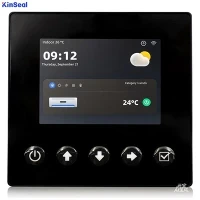


Touch Screen
What is Touch Screen
A touch screen is an electronic display screen that is also an input device. A user interacts with the computer, tablet, smartphone or touch-controlled appliance by using hand gestures and fingertip movements to tap pictures, moving elements or type words on the screen. The screens are pressure-sensitive and can be used or manipulated using fingers or a stylus. Touch screens are a helpful alternative to using a keyboard or mouse while navigating a graphical user interface (GUI). Some devices also use touch screens with a grid of infrared beams that sense a finger, negating the need for touch-sensitive input.
Advantages of Touch Screen
Simple clear interface
One of the most obvious benefits of touchscreen technology is its easy-to-use nature. You touch what you want to interact with, point where you want to go, and tap on what you want to open. In today’s age, where most users already interact with the touch screen in their pocket, using your solution will be intuitive, instinctive, fast and easy.
Self-Service Features
One of the clearest returns on investment for touch screen projects are in the areas of self service. Whether it is ordering food, selecting products, obtaining information, or visualising alternatives, it can all be done quickly and efficiently on a touch screen kiosk thereby reducing the need to hire, train and pay staff members.
Easy to Clean & Maintain
Touch screen monitors with their flat bezel free designs and water and dust sealed screens are easy to keep clean and sterile. This is really important in environments such as restaurants, hotels, hospitals and other healthcare settings.
Durability
Touch screens have toughened glass that is built to withstand constant physical interaction. Whilst not vandal proof, in that it won’t resist a hammer, it is designed to withstand the normal uses in rugged environments and unattended applications that cannot be withstood by other input devices. Range of industrial touch screens work in harsh conditions and through gloved hands, providing your staff with an uninterrupted workflow in manufacturing environments.






Why Choose Us
Team Introduced
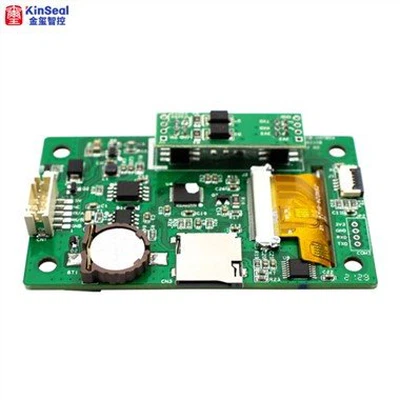
Kinseal intelligent control focuses on technological innovation and product quality. It has an independent R&D and technical team. In addition to meeting the application design and development of conventional products, it is also good at providing customers with personalized customized product development and professional technical support services.
Wide range of applications
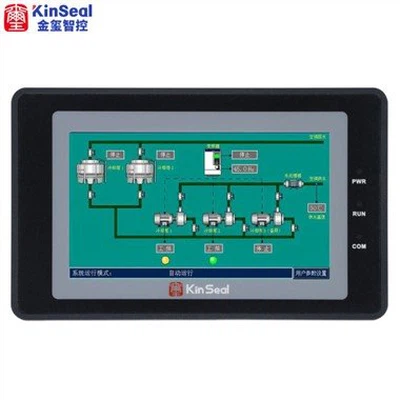
They are widely used in the fields of automotive instruments, charging piles of new energy vehicles, storage only, instruments and meters, artificial intelligence, home appliances, smart home, industrial automation equipment, handheld equipment, medical equipment, security equipment and so on.
Quality Control
Kinseal intelligent control products ensure superior performance and excellent quality of products through rigorous design and development, standardized production and strict quality control.
Our Factory
Shenzhen Kinseal Intelligent Control Technology Co., Ltd., established in 2015, is a national high-tech enterprise integrating R&D, production and sales. The company has been engaged in the development and application of industrial control touch screen, industrial control core board, human-computer interaction display terminal and serial human-computer interaction display module.
What Are the Different Types of Touch Screen Technologies
Capacitive
A capacitive touch screen panel is coated with a material that stores electrical charges. When the display panel is touched, it draws a small amount of charge to the point of contact. Circuits located at each corner of the panel measure the charge and send the information to the controller for processing. Users must touch capacitive touch screen panels with a finger, unlike resistive and surface wave panels that can accommodate a finger or a stylus. Capacitive touch screens are not affected by outside elements and have high clarity.
Infrared
Infrared touch screens use a matrix of infrared beams, which are transmitted by light-emitting diodes (LEDs) with a phototransistor receiving end. The infrared beam is blocked when a finger or tool is used near the display. This interruption provides the device with input on the location of the finger or tool.
Resistive
A resistive touch screen panel is coated with a thin metallic electrically conductive and resistive layer that when touched causes a change in the electrical current, which is registered as a touch event and sent to the controller for processing. Resistive touch screen panels are generally more affordable but offer only 75% clarity, and sharp objects can damage the layer. Resistive touch screen panels are not affected by outside elements such as dust or water.
Surface acoustic wave
Surface acoustic wave (SAW) technology uses ultrasonic waves that pass over the touch screen panel. When the panel is touched, a portion of the wave is absorbed. The change in the ultrasonic wave registers the position of the touch event and sends this information to the controller for processing. Surface acoustic wave touch screen panels are the most advanced of the three types, but outside elements can damage them.
Factors to Consider When Choosing Touch Screen Monitors for Various Industrie
Specific application scenarios and needs
Choose a touch screen based on the specific use environment to ensure stable and efficient operations. Different types of touch screen are available, and customers should select the one that best suits their needs.
Resolution
Select the appropriate resolution size that conforms to the operator's work habits to ensure work efficiency and production efficiency.
Durability
The touch screen needs to be durable and made of solid materials to operate reliably in harsh working environments. This is crucial for ensuring the safety and longevity of touch screen.
Size
The size of the touch screen is important to consider, as it can affect the ease of use and functionality of the device. Large screens are often preferred in industries such as gaming or design, while smaller screens may be more suitable for mobile or portable devices.
Touch Technology
There are different types of touch technologies available, including resistive, capacitive, infrared, and surface acoustic wave. Each technology has its own advantages and disadvantages, and it is important to choose the right one that fits your industry's needs.
Operating System
The operating system of the touchscreen is an important consideration as it can affect the compatibility with other devices and software applications. Make sure to choose a touch screen that is compatible with the operating system used in your industry.
Connectivity
The connectivity options of the touch screen are important to consider, such as USB, HDMI, VGA, and DVI. Make sure the touch screen has the necessary connectivity options to connect with other devices in your industry.
Customization
Some industries may require customized touch screens with specific features or functionalities to meet their needs. Consider whether customization is an option with the touch screen you are considering.
Exploring the Parts of a Touch Screen
Touch Sensor
All touchscreens have a touch sensor. The touch sensor is a component that, as the name suggests, is designed to detect or “sense” touch commands. How does the touch sensor work exactly? Touch sensors work in different ways depending on the specific technology used by the touchscreen device. Capacitive touchscreens — the most common type of touchscreen device — use a capacitive-based touch sensor. They emit a small electrical charge across the touch sensor layer. When you press your finger on it, you'll change the electrical charge of the touch sensor layer.
Capacitive touch sensors detect touch commands by looking for changes in the electrical charge of the touch sensor layer. The human body conducts electricity. Therefore, touching the touch sensor layer will change its electrical charge. Your finger will essentially increase its capacitance, which the capacitive touchscreen will identify as a touch command.
Layers
Touchscreens are manufactured of multiple layers. Depending on the type of touchscreen, these layers may consist of tempered glass or plastic. In resistive touchscreens, the layers have electrodes on their opposite-facing sides. Performing a touch command will press the layers together so that the electrodes make contact with each other.
Touch Controller
Touchscreens also have a touch controller. The touch controller is located in the middle of the touchscreen. It sits behind the touch sensor and in front of the device's computer. The touch controller is designed to convert analog touch signals into digital touch signals.
Without a touch controller, a touchscreen wouldn't be able to respond to your touch commands. The touch sensor may detect your commands, but the touchscreen can only process them if there's a touch controller present. The touch controller takes the analog signals created by your touch commands, and it converts them into digital signals that the device can understand.
1. ITO Glass Procurement and Quality Check
The process begins with the purchase of Indium Tin Oxide (ITO) glass, a crucial component for its conductive properties. The quality of the ITO glass is rigorously checked, and any substandard materials are returned to the supplier.
2. Cleaning the ITO Glass
The ITO glass undergoes a thorough cleaning process in a dust-free environment. This step is repeated at least three times to ensure that no dust or impurities remain, as these can compromise the performance and durability of the touchscreen.
3. Quality Inspection
After cleaning, each piece of ITO glass is inspected for any remaining dust or impurities. Any defective pieces are cleaned again or discarded.
4. Circuit Design and Mold Preparation
A mold is created based on the circuit design of the touchscreen panel. This mold is used to precisely print the circuit patterns onto the ITO glass.
5. Printing Protective Blue Glue
A protective blue glue is printed on the ITO glass to safeguard the conductive areas and prevent dust from entering. This glue is applied on both sides of the ITO glass.
6. High-Temperature Drying
The ITO glass with the printed glue is then placed in a high-temperature oven for drying to ensure the glue is firmly set.
7. Laser Etching
Laser etching is used to define the conductive lines on the ITO glass. After etching, each piece is inspected under a microscope to ensure the lines are clear and precise.
8. ITO Glass Cutting
The ITO glass panels are cut into the required sizes using laser or straight cutting methods, depending on the touchscreen's design.
9. Appearance and Quality Check
The cut pieces are inspected for quality and appearance. Defective pieces undergo analysis and repair if possible.
10. FPC Procurement and Quality Check
Flexible Printed Circuits (FPC), which include the touch chip and other components, are procured and inspected for quality.
11. FPC Bonding
The FPC is bonded to the ITO glass using specialized machinery to ensure precision and consistency.
12. FPC Glue Fixing
A dedicated staff member applies glue to fix the FPC in place securely.
13. Cover Lens Procurement and Inspection
Cover lenses are purchased and inspected for any defects. The lenses are then cleaned and prepared for bonding with the ITO glass.
14. Bonding in a Dust-Free Environment
The cover glass and ITO glass, along with the bonded FPC, are assembled in a dust-free workshop to prevent any contamination.
15. Vacuum Degassing
The assembled touchscreen undergoes vacuum degassing to remove any air bubbles that could affect touch sensitivity.
16. Final Quality Assurance
Each touchscreen is subjected to a final quality check to ensure it meets all specifications. This includes functional testing to verify touch sensitivity and performance.
Six Common Applications of Touch Screen
Whether it runs Android or iOS, nearly every smartphone has a touch screen interface. Touch screens have become synonymous with smartphones.
In addition to smartphones, nearly all tablet computers feature touch screen interfaces. Tablet computers, as you may know, run the same mobile operating systems (OSs) as smartphones. The main difference between the two is that smartphones are smaller and support calls, whereas tablets are larger and may or may not support calls. Nonetheless, they both feature a touch screen interface.
Another common application for touch screen technology is human machine interfaces (HMIs). HMIs are industrial control systems used in manufacturing facilities and other commercial workspaces. While some of them are basic and consist of nothing more than levers and knobs, others are more complex. Some complex HMIs use a touch screen interface to provide a method of control.
Retail stores, as well as other businesses, often use touch-screen-based point-of-sale (POS) systems. POS systems allow businesses to accept and process payments from their customers. Traditional cash registers are rarely used by modern businesses. Instead, businesses today use touch-screen-based POS systems.
You'll often find infotainment systems with a touch screen interface. An infotainment system is a type of electronic system in automobiles that provides information and entertainment. Most infotainment systems feature touch screen interfaces that the driver or a passenger can use to control it. Some of them feature physical buttons as well, but nearly all modern infotainment systems have a touch screen interface.
Smart appliances often utilize touch screen interfaces. Smart appliances consist of washing machines, clothes dryers, ovens and other major household appliances that offer some form of wireless connectivity and/or automation. They are designed to optimize energy usage so that the respective appliance consumes less energy during operation. When shopping for a smart appliance, you may discover that many of them feature a touch screen interface. The presence of a touch screen interface offers an easy and convenient method of control.
The nature of an industrial environment means your touchscreens will regularly get exposed to potentially damaging elements such as moisture, grease, dirt, dust and extreme temperatures. However, by using your touchscreens properly and taking steps to minimize hazardous exposure, you can prevent damage and keep your monitors operating correctly for a long time. Here are a few tips for how to use your industrial touchscreens properly.
Be gentle
Exposure to shocks and vibrations can damage touchscreens, as can handling them too roughly. When inputting commands, only use the necessary pressure and avoid hitting the screen too hard. Try to position touchscreens in places where they are not likely to get bumped accidentally during regular operations.
Keep your hands clean
Try to wash or wipe your hands before using industrial touchscreens. While this may not always be possible in particularly dirty or dusty work environments, keeping your hands clean when operating touchscreens will reduce the amount of dirt and grease that collect on the screen and improve touchscreen performance.
Take off your gloves
Many modern touchscreens come with built-in capacitive sensor technology that helps them recognize a human touch. Wearing gloves can interfere with these touch sensors and make it difficult to navigate touchscreen controls or even make the screen entirely unresponsive. If operators attempt to use touchscreens while wearing gloves, they will likely end up pressing too hard and damage display components.
Use an appropriate stylus
If you are working in an environment where it is necessary to wear gloves, such as a medical or another sterile setting, use a stylus to operate the touchscreen. Choose a stylus specifically designed for touchscreens or tablets. Using another tool like a pen or pencil can scratch the screen and may not work as designed. Using a stylus instead of your fingers also helps keep the touchscreen cleaner.
Place screens in safe locations
Whenever possible, install touchscreen displays and monitors in safe areas away from severe conditions like extreme temperatures and moisture. While other common touchscreen problems like incorrect calibration or a dirty screen are easy to fix, damage to internal touchscreen components can require a more extensive and costly repair.
How to Clean Touch Screen
Regularly cleaning industrial touchscreens is an easy way to protect them from malfunction and damage. A simple wipe-down will remove grease and smudges from regular use and prevent dirt and dust from getting inside the equipment.
All you need to clean a touchscreen properly is a soft lint-free cloth, distilled water and a cleaning solution. Microfiber cloths are often the best choice for cleaning screens, as they are soft and non-abrasive. Using a regular cloth or paper towel can scratch the screen surface. Use distilled water to dampen the cloth for removing stuck-on dirt. It's also possible to clean touchscreens with regular tap water, but it may leave marks after cleaning, whereas distilled water will not.
Follow these steps for how to clean a touchscreen properly
Turn off the touchscreen: Before cleaning, turn off the touchscreen and the equipment connected to it. This step will protect the machinery from damage and make it easier to see dirt and smudges on the screen when it is not lit. If you are unable to turn off the screen, such as for a continuous-duty operation, lock the touchscreen so you cannot accidentally hit any commands while cleaning it. Many touchscreens also have an option that will lock the screen and make it unresponsive to touches during cleaning.
Wipe the screen with a dry cloth: Using a microfiber cloth, wipe the screen gently in small circles. Use light pressure to remove dust and smudges without damaging the screen. Do this when the cloth is still dry first to remove the majority of dirt and grime.
Dampen the cloth and spot clean: After the initial cleaning, check if any spots remain. If the touchscreen still has built-up dirt, dampen a microfiber cloth with your cleaning solution and gently rub the spots away. Always moisten the cloth rather than spraying cleaner directly onto the touchscreen to prevent water damage.
Dry the touchscreen: Before turning your touchscreen and equipment back on, give it one more pass with a dry, lint-free cloth to remove any remaining moisture. Letting your touchscreen dry completely before use will ensure it does not get damaged.
FAQ
We're professional touch screen manufacturers and suppliers in China, specialized in providing high quality products with low price. We warmly welcome you to wholesale discount touch screen in stock here from our factory.