


Industrial Touch Screen HMI
What is Industrial Touch Screen HMI
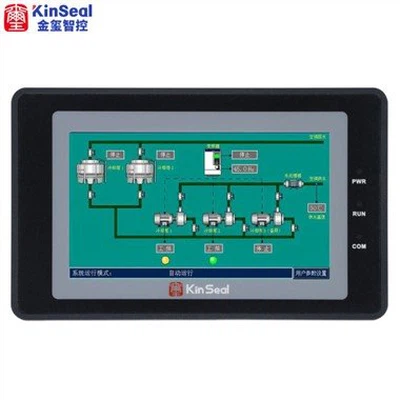
Industrial touch screen HMI can display various parameters when the machine is running so that users can better understand the operation of the machine. The product is dust-proof and waterproof to prevent water and dust from entering the display screen and causing damage. Adopt anti-ultraviolet materials, with protection grade up to IP65. It has high resolution and can clearly display complex process parameters and the production panorama of the whole factory. This product is widely used in different industrial production fields, providing you with a variety of functional experiences. The excellent waterproof property makes the product not easy to get wet, thus protecting the integrity of its internal circuit. A variety of brightness levels enable
Advantages of Industrial Touch Screen HMI
Enhanced User Experience and Intuitive Interface
One of the key advantages of industrial touch screen HMI is the enhanced user experience they offer. Unlike conventional control panels that required physical buttons or knobs, these panels leverage advanced touch technology to provide a highly intuitive interface.
Improved Efficiency and Real-time Control
Industrial touch screen HMI enable real-time control and monitoring, enabling operators to make instant decisions and adjustments, which greatly improves overall efficiency. With live data and visual representations of processes and equipment, operators can easily identify anomalies and respond promptly to prevent downtime and equipment failures.
Flexibility and Customizability
Industrial touch screen HMI offer a high level of flexibility and customizability, allowing operators to tailor the interface according to their specific needs. These panels can be adapted to display data in various formats, such as graphs, charts, gauges, or tables, depending on the requirements of the process or application.
Space-saving and Compact Design
In the industrial environment where space is often at a premium, touchscreen HMI panels provide a space-saving solution. By eliminating physical buttons and knobs, these panels offer a more compact design, reducing the overall footprint of control systems. The sleek and streamlined form factor not only improves aesthetics but also allows for better utilization of limited space.panels.






Why Choose Us
Team Introduced
Kinseal intelligent control focuses on technological innovation and product quality. It has an independent R&D and technical team. In addition to meeting the application design and development of conventional products, it is also good at providing customers with personalized customized product development and professional technical support services.
Wide range of applications
They are widely used in the fields of automotive instruments, charging piles of new energy vehicles, storage only, instruments and meters, artificial intelligence, home appliances, smart home, industrial automation equipment, handheld equipment, medical equipment, security equipment and so on.
Quality Control
Kinseal intelligent control products ensure superior performance and excellent quality of products through rigorous design and development, standardized production and strict quality control.
Our Factory
Shenzhen Kinseal Intelligent Control Technology Co., Ltd., established in 2015, is a national high-tech enterprise integrating R&D, production and sales. The company has been engaged in the development and application of industrial control touch screen, industrial control core board, human-computer interaction display terminal and serial human-computer interaction display module.
Types of Industrial Touch Screen HMITechnology
Resistive Touchscreen Technology
The resistive touchscreen consists of a flexible top layer made of Polyethylene (PET) and a rigid bottom layer made of glass. Both the layers are coated with a conducting compound called Indium Tin Oxide (ITO) and then spaced with spacers. While the monitor is operational, an electric current flows between the two layers. When a touch is made, the flexible screen presses down and touches the bottom layer. A change in electrical current is hence detected and the coordinates of the point of touch is calculated by the controller and parsed into readable signals for the operating system to react accordingly.
These systems transmit only 75% of light from the monitor. The resistive touchscreen is further divided into 4-, 5-, 6-, 7- and 8-wired resistive touchscreen. While the constructive design of all these modules is similar there is a major distinction in each of its method to determine the coordinates of touch.
The Four-wire Resistive Touchscreen uses both the layers to calculate the axes information of the touch. Touch measurement in the 4-wire is a 2 step process. The x-coordinate of the touch point is calculated by creating a voltage gradient on the flexible layer, and the y-coordinate is determined by creating a voltage gradient along the bottom layer.
The Eight-wire Resistive Touchscreen is simply a variation of the 4-wire one with the addition of 4 sense wires, two for each layer. The sensing points aid in reducing the environmental drift to increase the stability of the system. The 8-wire systems are employed in sizes of 10.4” or larger where the drift can be significant.
The Five-wire Resistive Touchscreen do not uses the coversheet (flexible layer) in determining the touch coordinate. All the position sensing is employed on the stable glass layer. In this design, one wire goes to the coversheet and four wires are deployed to the four corners of the bottom sheet. The coversheet only acts as a voltage measuring probe. The functioning of the touchscreen remains unscathed even with changes in the uniformity of the conductive coating over the coversheet.
The Six and Seven wire resistive touchscreen is also a variant to the 5 and 4 wire technology respectively. In the 6-wire resistive touchscreen an extra ground layer is added behind the glass plate which is said to improve system's performance. While, the seven–wire variant has two sense lines on the bottom plate. However, these technologies are as prevalent as their counterparts.
Capacitive Touchscreen Technology
The Capacitive Touchscreen Technology is the most popular and durable touchscreen technology used all over the world at most. It consists of a glass panel coated with a capacitive (conductive) material Indium Tin Oxide (ITO). The capacitive systems transmit almost 90% of light from the monitor.
Surface-Capacitive screens, in this technique only one side of the insulator is coated with a conducting layer. While the monitor is operational, a uniform electrostatic field is formed over the conductive layer. Whenever, a human finger touches the screen, conduction of electric charges occurs over the uncoated layer which results in the formation of a dynamic capacitor. The computer or the controller then detects the position of touch by measuring the change in capacitance at the four corners of the screen.
In the Projected-Capacitive Touchscreen Technology, the conductive ITO layer is etched to form a grid of multiple horizontal and vertical electrodes. It involves sensing along both the X and Y axis using clearly etched ITO pattern.
Surface Acoustic Wave Touchscreen technology
The Surface Acoustic Wave Touchscreen technology contains two transducers (transmitting and receiving) placed along the X-axis and Y-axis of the monitor's glass plate along with some reflectors. The waves propagate across the glass and are reflected back to the sensors. When the screen is touched, the waves are absorbed and a touch is detected at that point. These reflectors reflect all electrical signals sent from one transducer to another. This technology provides excellent throughput and image clarity.
Infrared Touchscreen Technology
In the Infrared Touchscreen Technology, an array of X- and Y- axes are fitted with pairs of IR Leds and photo detectors. The photo detectors detect any change in the pattern of light emitted by the Leds whenever the user touches the monitor/screen.
Factors to Consider When Selecting an Industrial Touch Screen HMI
Screen Size and Resolution
One of the primary considerations in choosing an industrial touch screen HMI is determining the appropriate screen size and resolution for your project. The screen size should be large enough to display all the necessary information without causing strain on the user's eyes. Similarly, a higher resolution ensures greater clarity, reducing the chances of misinterpretation and errors. Carefully assess your project's requirements and consider factors such as viewing distance and content complexity to determine the ideal screen size and resolution.
Touch Technology
Industrial touch screen HMI utilize various touch technologies, including resistive, capacitive, surface acoustic wave (SAW), and infrared. Each technology offers distinct advantages and suits different project requirements. Resistive touch screens are cost-effective and highly durable, making them suitable for demanding industrial environments. Capacitive touch screens provide superior touch accuracy and are renowned for their responsiveness. SAW touch screens offer excellent image clarity and are resistant to external contaminants. Infrared touch screens offer multi-touch capabilities, enabling intuitive gestures. Understanding the different touch technologies and their pros and cons can help you make the right choice for your project.
Environmental Considerations
The environment in which the industrial touch screen HMI will be deployed plays a crucial role in determining its suitability for your project. Factors such as temperature, humidity, dust, and vibration levels need to be taken into account. Some touch screens are specifically designed to withstand harsh industrial conditions, while others are more suitable for clean office environments. Assessing the environmental conditions and ensuring that the chosen industrial touch screen HMI meets the required standards is essential to prevent performance issues and premature failure.
Connectivity and Compatibility
Another vital factor to consider is the connectivity and compatibility of the industrial touch screen HMI with your existing systems or devices. Ensure that the touch screen integrates seamlessly with your project's architecture, protocols, and communication standards. Compatibility issues can lead to significant delays, additional costs, and potential system failures. It is advisable to consult with the touch screen manufacturer or supplier to verify compatibility and discuss any necessary adaptations or software modifications.
User Interface Customization
The ability to customize the user interface of the industrial touch screen HMI is a critical consideration, as it directly impacts the user experience. A user-friendly and intuitive interface enhances productivity and minimizes training requirements. Look for touch screens that offer customizable widgets, graphics, and layout options to tailor the interface to your project's specific needs. The availability of software development kits (SDKs) or programming tools can also facilitate interface customization and enable seamless integration with your project's software.
The Importance of Industrial Touch Screen HMI
Industrial touch screen HMI serve as the vital gateway between operators and machines, facilitating the monitoring and control of various industrial processes. They provide a visual representation of the production line, allowing operators to quickly assess the status, detect anomalies, and make necessary adjustments. With intuitive touch controls and real-time data display, these touch panels empower operators to optimize efficiency, minimize downtime, and ensure quality control.


Integration and compatibility
Before implementing HMI touch panels, it is crucial to consider their integration and compatibility with existing systems. Compatibility issues can lead to delays, malfunctions, and unnecessary costs. Collaborating with HMI panel manufacturers or system integrators can help in assessing compatibility requirements and identifying any necessary upgrades or modifications. Additionally, conducting thorough testing and verification during the integration phase ensures seamless integration and minimizes the risk of unplanned disruptions.
User interface design
An intuitive and user-friendly interface design plays a crucial role in maximizing the effectiveness of HMI touch panels. The interface should be designed with the end-users in mind, considering their specific needs, skill levels, and tasks at hand. Clear and concise labeling of controls, logical grouping of functions, and consistent colors and icons improve usability. It is essential to strike a balance between simplicity and functionality, avoiding cluttered screens that may confuse operators. Regular feedback and usability testing with operators can help refine the interface and optimize user experience.
Real-time monitoring and data visualization
Real-time monitoring and data visualization are at the heart of HMI touch panels. These panels provide live updates on machine status, production rates, energy consumption, and other relevant metrics. Alongside real-time data, historical data visualization enables operators to identify patterns, trends, and potential bottlenecks. Implementing customizable dashboards and data visualization tools empowers operators to access critical information at a glance, facilitating informed decision-making. Furthermore, employing advanced analytics and machine learning algorithms can provide predictive insights, enabling proactive maintenance and optimization.
Remote access and connectivity
In today's interconnected world, remote access and connectivity options are highly sought after features in industrial touch screen HMI. Remote access allows authorized personnel to monitor and control operations from anywhere, enhancing flexibility and responsiveness. It enables operators and maintenance teams to address issues promptly, reducing downtime and increasing overall efficiency. Secure remote connectivity protocols, such as Virtual Private Networks (VPNs), should be implemented to safeguard sensitive data and protect against unauthorized access.
Exploring the Versatility of Industrial Touch Screen HMI Across Different Industries
Manufacturing Industry
Manufacturing processes are intricate and require meticulous monitoring and control to ensure optimal productivity. Industrial industrial touch screen HMI have played a pivotal role in transforming this industry by providing real-time data visualization, efficient process control, and seamless connectivity for different equipment and machinery. These panels allow operators to monitor and control various aspects such as temperature, pressure, and speed, enabling them to make informed decisions promptly. With the ability to integrate with other manufacturing systems, industrial touch screen HMI facilitate streamlined production, reduce downtime, and enhance overall efficiency.
Automotive Industry
The automotive industry heavily relies on complex machinery and automation for manufacturing vehicles. Industrial touch screen HMI have emerged as a game-changer in this industry, enhancing efficiency, production quality, and overall performance. These panels allow operators to control and monitor robotic systems, assembly lines, and various critical processes in real-time. The user-friendly interface of industrial touch screen HMI simplifies the control of different parameters such as production speed, machine coordination, and quality assurance, contributing to increased productivity and reduced errors.
Healthcare Industry
In the healthcare industry, where patient safety and efficient operations are paramount, industrial touch screen HMI have revolutionized how medical professionals interact with advanced medical equipment and systems. These panels provide a user-friendly interface that allows doctors, nurses, and technicians to control and monitor medical devices, such as MRI machines, ventilators, and surgical robots, with precision and ease. The intuitive nature of industrial touch screen HMI simplifies complex workflows, reducing the risk of errors and improving patient outcomes.
Energy Sector
The energy sector encompasses various complex processes, including power generation, transmission, and distribution. Industrial touch screen HMI have transformed this industry by providing operators with a comprehensive view of energy systems, enabling efficient control, monitoring, and management. These panels offer real-time visualization of critical parameters such as power generation, grid performance, and equipment status, allowing operators to make informed decisions and respond to anomalies promptly.
Transportation Industry
The transportation industry heavily relies on efficient logistics, vehicle control, and passenger safety.Industrial touch screen HMI have become increasingly popular in this industry for their ability to streamline and enhance these aspects. These panels are widely used in control rooms to monitor and manage traffic systems, railway operations, airport management, and other transportation infrastructure. The intuitive interface of industrial touch screen HMI enables operators to visualize and control the movement of vehicles, monitor traffic conditions, and respond to emergencies swiftly.
HMI Screen
The immediately obvious exterior of the HMI is the screen itself, with a hardened plastic (and sometimes metal) bezel around the perimeter. This provides a surface from which to secure the screen into a cutout along with a rubber or weatherproof gasket to force a secure connection.
Main Control Board PCB
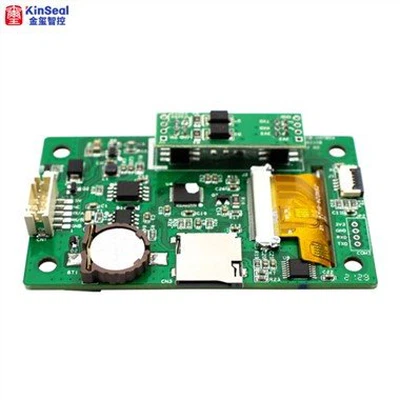
With the back of the plastic case removed, two important items are visible. First is the main PCB that houses all of the communication and processing capabilities. Since this HMI is only a display and input interface, it will not contain connections for any actual I/O devices. Rather, the network and programming ports can be seen which allow it to share data with the central control system. The other important item is the battery, connected via the short red/black wire set on the back cover.
HMI Battery Replacement
This battery serves a similar purpose to those contained on typical PC motherboards and PLC CPUs, called a CMOS battery. This retains clock and basic I/O settings for initial startup. That critical information must stay in the memory of the computer even while it's turned off and removed from power for extended periods of time, and this battery provides the ultra-small current required for such a task.
Communication and Networking PCB
This part of the HMI explains itself quite obviously to the experienced engineer. A variety of power and communication ports allow the HMI to network along with control equipment and accept programming instructions from a PC. This means you can expect to find Ethernet, USB, serial, and other ports.
You can't claim that any piece of an HMI is ‘more important’ than any other part, however, this PCB is critical for operation. Slits and vanes in the back cover allow proper airflow for cooling. Make sure the vents remain open, but at the same time, be sure that excess dirt and contaminants remain far away.
Finally, when performing any drilling or cutting near the HMI (this is common when it's mounted inside a cabinet door and new button holes must be drilled, for example), never allow bits of conductive metal to fall into the back and touch this PCB. It will almost certainly cause failure.
HMI Touchscreen Components
The remaining sections of the HMI constitute the screen itself. This part is reminiscent of any screen replacement process for a laptop, TV, phone, etc.
Most of these components are not user-serviceable. In fact, due to the adhesive used to attach the thin glass screen to the plastic frame, I resorted to cutting the screw posts with a rotary cutoff tool in order to break down the inner components.
Protective Cover
First, the thin glass screen on the left side below is covered by an equally thin plastic protective cover, shown on the right. During normal operation, the cover protects the screen from dust and dirt, as well as moisture, while still thin enough to respond to the touch input. Do NOT push too hard or use anything other than a finger or stylus. The plastic can easily flex enough that a sharp object will break the glass.
Touchscreen Connector
Fixed to the surface of the screen is a flexible membrane with a capacitive network of conductors. These form an x-y grid of sensitivity, enough to locate the center of a finger or stylus press. This touch screen is connected to the driver boards by means of a thin, flexible ribbon connector,
Screen Driver PCBs
First is the backlight driver. This power PCB converts a low power input into a high voltage that illuminates a backlight. Usually, the brightness can be adjusted from the HMI settings menu. The input power and control come from the blue wires, and the power output to the lights are through the white/pink wire sets along the top and bottom of the screen.
Finally, the display driver converts the input signal from the main control PCB into the commands that control each pixel to turn on/off and set a color. Once again, this is the same scheme as used for every flat-panel display ever created (CRT displays are a whole different story). Variations exist in how the signal is sent for LED vs. LCD screens, but all will have a similar look and feel.
FAQ
We're professional industrial touch screen hmi manufacturers and suppliers in China, specialized in providing high quality products with low price. We warmly welcome you to wholesale discount industrial touch screen hmi in stock here from our factory.
10 point multi touch screen, 3.5 tft lcd display, white touchscreen monitor