




1 Introduction
Industrial equipment communication typically involves a wide variety of hardware and software products, as well as protocols used to connect standard computer platforms (personal computers or workstations) to industrial automation devices. Consequently, most automation devices are designed to execute simple serial commands that are compatible with the standard serial ports found on personal computers or on add-on serial port cards. RS-232 is currently the most widely used serial interface in the PC and industrial communications sectors. RS-232 is defined as a single-ended standard designed to extend communication distances in low-speed serial communication. Because RS-232 shares a common signal ground between the transmitter and receiver, it cannot use differential signals; otherwise, common-mode noise would couple into the signal system. The RS-232 standard specifies a maximum distance of only 15 m and a maximum signal transmission rate of 20 kbit/s.
CAN, short for "Controller Area Network," is one of the most widely used fieldbuses internationally. A single network composed of CAN buses is limited by the electrical characteristics of the network hardware. As a multi-master serial communication bus, CAN's basic design specifications require high bit rates and strong resistance to electromagnetic interference, as well as the ability to detect any errors occurring on the communication bus. Even when the signal transmission distance reaches 10 km, CAN can still provide data transmission rates of up to 50 kbit/s. Table 1 shows the relationship between the maximum transmission distance between any two nodes on a CAN bus and their bit rates.
Maximum Distance Between Any Two Nodes in a Triangular Configuration in a CAN Bus System
Bit Rate/kbps 1000 500 250 125 100
Maximum Distance/m 40 130 270 530 620
Bit Rate (kbps) 50 20 10 5
Maximum Distance (m) 1300 3300 6700 10000
As can be seen, the CAN bus is a superior serial bus to RS-232 in terms of real-time performance, adaptability, flexibility, and reliability. When two serial devices are located far apart and cannot be connected directly via RS-232, RS-232 can be converted to CAN to achieve network interconnection of the serial devices via the CAN bus.
However, RS-232 and CAN differ significantly in terms of voltage levels and frame formats. Specifically:
The RS-232 standard uses negative logic, defining any voltage level between +3V and +15V as a logic "0" and any voltage level between -3V and -15V as a logic "1." CAN signals, on the other hand, are transmitted using differential voltage. The two signal lines are called "CAN_H" and "CAN_L." In the static state, both are approximately 2.5V; this state is represented as a logical "1" and is also referred to as "recessive." When CAN_H is higher than CAN_L, it represents a logical "0," known as "dominant." In the dominant state, the typical voltage values are: CAN_H = 3.5V, CAN_L = 1.5V;
The frame format for the RS-232 serial port is: one start bit, eight data bits, a programmable ninth bit (which serves as the address/data bit for both transmission and reception), and one stop bit. The CAN data frame format consists of: frame header + ID + data (which can be divided into two formats: standard frames and extended frames).
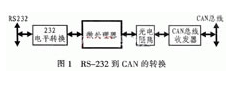
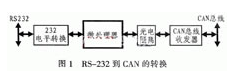 Therefore, the design requires a microcontroller to perform conversions such as level and frame format conversions. The conversion process is shown in Figure 1.
2 Hardware Design for RS-232-to-CAN Conversion
In designing the RS-232-to-CAN conversion device, the AT89C52 microcontroller is used as the microprocessor; the SJA1000 is used as the CAN microcontroller. The SJA1000 integrates the physical layer and data link layer functions of the CAN protocol and can passively handle the framing of communication data; The AT82C250 serves as the interface between the CAN controller and the physical bus, providing differential transmission capability for the bus and differential reception capability for the CAN controller. Three different operating modes (high-speed, slope control, and standby) can be selected via pin 3 of the AT82C250. When pin 3 is grounded, the device operates in high-speed mode; high-speed optical isolation is implemented using the 6N137, which prevents interference from external signals; The MAX232 is used to convert 232-level signals to TTL levels for the microcontroller interface chip. For specific hardware interface circuit details, please refer to the relevant resources for the SJA1000; further explanation is not provided here. However, the following points should be noted.
(1) A 120Ω resistor is connected at both ends of the CAN bus to match the bus impedance, thereby improving the immunity to interference and the reliability of data communication. In practice, however, it is sufficient to ensure that the shunt resistor between "CAN_H" and "CAN_L" in the CAN network is 60Ω.
(2) Pin 20 (RX1) of the SJA1000 can be grounded when not in use (see the software design for the specific reason); when combined with setting bit CDR.6, this can significantly increase the bus length.
(3) The connection method of pins TX0 and TX1 determines the level of the serial output. Refer to the settings in the Output Control Register (OCR) for specific details.
(4) A slope resistor is connected between the RS pin of the AT82C250 and ground. The resistance value can be adjusted appropriately based on the bus communication speed, typically ranging from 16 kΩ to 140 kΩ.
(5) The MAX232 requires four electrolytic capacitors-C1, C2, C3, and C4-which are also used for internal power conversion. All have a rating of 1 μF/25 V; tantalum capacitors are recommended, and they should be placed as close to the chip as possible. A 0.1 μF decoupling capacitor must be connected between the VCC power supply and ground.
3 Software Design for RS-232 to CAN Conversion
Under microprocessor control, using serial port reception and CAN interrupts during data exchange between RS-232 and CAN can improve operational efficiency. The main program flowchart is shown in Figure 2. The SJA1000 can only be initialized in reset mode; this primarily includes setting the operating mode, clock division, and acceptance filter registers, configuring baud rate parameters, and setting the interrupt enable register.
Whether data can be transmitted accurately also depends on the baud rate and flow control, which are aspects that cannot be overlooked during software design. Therefore, the following sections will focus on CAN baud rate configuration, automatic detection of serial port baud rates, and serial port data flow control.
3.1 Setting the CAN Filter Rate
One of the key elements of the CAN protocol is the baud rate. Users can set the position of the bit sampling points within the bit period and the number of samples, allowing them to freely optimize network performance for their applications. However, during this optimization process, attention must be paid to the relationship between the tolerance of the reference oscillator used for bit timing parameters and the propagation delays of different signals within the system.
The system's bit rate, fBil, represents the number of data bits transmitted per unit of time, i.e., the baud rate fBit = 1/tBit. The nominal bit timing consists of three non-overlapping segments: SYNC_SEG, TSEG1, and TSEG2. These three time segments are denoted as tSYNC_SEG, tTSEG1, and tTSEG2, respectively. Therefore, the nominal bit period tBit is the sum of these three time segments.
tBit = tSYNC_SEG + tTSEG1 + tTSEG2
Within the bit period, these segments are expressed in terms of integer multiples of a basic time unit. This time unit is called the time quota (TQ), and the duration of a time quota is one cycle of the CAN system clock (tSCL), which is derived from the oscillator clock period (tCLK). The CAN system clock can be adjusted by programming the prescaler factor (baud rate preset value, BRP). Specifically:
tSCL = BRP × 2tCLK = 2BPR/fCLK
Another very important time interval for CAN bit timing calculations is the synchronization jump width (SJW), which has a duration of tSJW. The SJW segment is not part of the bit cycle; rather, it defines the maximum number of TQs by which the bit cycle is extended or shortened during a resynchronization event. In addition, the CAN protocol allows users to specify the bit sampling mode (SAM), which can be either single-sample mode or three-sample mode (selecting one result from three samples). In single-sample mode, the sampling point is at the end of the TSEG1 segment. In three-sample mode, two additional sampling points are taken compared to single-sample mode; these are located before the end of the TSEG1 segment, separated by one TQ.
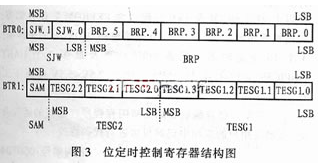
The BPR, SJW, SAM, TESG1, and TESG2 mentioned above can all be defined by the user via the internal registers BTR0 and BTR1 of the CAN controller. Details are shown in Figure 3. After BTR0 and BTR1 are set, the actual baud rate range is:
Maximum = 1/(tBit - tSJW), Minimum = 1/(tBit + tSJW)
3.2 Serial Port Baud Rate Detection
When a serial device acts as the host, if you need to detect the serial port baud rate of the conversion device at that time, you can first set the host's receive baud rate (9600 baud, for example) and send a specific character (a carriage return, for example) from the terminal. In this way, the host can determine the communication baud rate of the conversion device based on the received character information. The ASCII value of the carriage return character is 0DH; the values received at different baud rates are listed in Table 2.
Bytes Received at Different Baud Rates
Baud Rate (bit/s) Received Bytes (Hexadecimal) Baud Rate (bit/s) Received Bytes (Hexadecimal)
1200 80 4800 E6
1800 F0 9600 0D
2400 78 19200 F*
3.3 Serial Port Flow Control
The term "flow" used here refers to data flow. Data loss often occurs during transmission between two serial ports. Since the microcontroller's buffer has limited capacity, if the buffer is full when data is being received, any data continuing to be sent at that time will be lost. Flow control effectively solves this problem: when the receiving end cannot process the data in time, the flow control system sends a "do not receive" signal, causing the sending end to stop transmitting until it receives a "resume transmission" signal. Therefore, flow control manages the data transmission process and prevents data loss. The two commonly used types of flow control are hardware flow control (including RTS/CTS, DTR/CTS, etc.) and software flow control (XON/XOFF-continue/stop). The following explanation focuses solely on the hardware flow control method using RTS/CTS.
When using hardware for flow control, the RTS and CTS pins of the serial terminal are connected to the microcontroller's I/O ports, and start/stop signals are received and transmitted by setting the I/O ports to 1 or 0. The data terminal equipment (such as a computer) uses RTS to initiate the data stream sent by the microcontroller, while the microcontroller uses CTS to start and pause the data stream from the computer. To implement this hardware handshaking method, a high-level flag and a low-level flag are set during programming based on the size of the receiving buffer. When the amount of data in the buffer reaches the high-level threshold, the CTS line at the receiving end is set low (logic 0). When the program at the transmitting end detects that CTS is low, it stops transmitting data until the amount of data in the receiving buffer falls below the low-level threshold and CTS is set high. RTS is used to indicate whether the receiving device is ready to receive data.
3.4 CAN Receive Subroutine
The PeliCAN format supports both standard and extended frames. The CAN mode can be configured using CDR.7 in the clock divider register (0 for BasicCAN, 1 for PeliCAN). When receiving CAN data, the FF bit in the frame information is used to determine whether it is a standard or extended frame, and the RTR bit is used to distinguish between a remote frame and a data frame. The following is the CAN receive subroutine:
;//////////////////////////////////////////////////////////////////
;//CAN Data Reception/Unified into a Frame Format with a 2-Byte ID//
;///////////////////////////////////////////////////////////////////////
RECAN:
MOV R0, #C_RE ; Start address of the microcontroller's internal buffer
MOV DPTR, #RXBUF ; Read and save the contents of the receive buffer
MOVX A, @DPTR ; Read the second byte of the CAN buffer
MOV @R0, A ; Save
JB ACC.7, EFF_RE ; FF bit: 0 = SFF, 1 = EFF
MOV R2, #0
SJMP SFF_RE ; Depending on the ID number, the position where the "data byte" is captured varies
EFF_RE: MOV R2, #2
SFF_RE: MOV R2, #2
SFF_RE:
JB ACC.6, EXIT_RECAN ; Check the RTR bit; if 1 (remote frame), jump out
ANL A, #0FH
MOV R3, A ; At this point, the middle 4 bits represent the data length
MOV C_NUM, A ; Store the length of the received frame in R3 and R5
RDATA0:
INC DPTR ; 2-byte ID
INC R0
MOVX A, @DPTR
MOV @R0, A
INC DPTR
MOVX A, @R0, A
INC DPTR
MOVX A, @DPTR
MOV @R0, A
MOV A, R2 ; If EFF, skip the two-byte ID
JZ DRATA1
INC DPTR
INC DPTR
DATA1: ; Data bytes
INC DPTR
INC R0
MOVX A, @DPTR
MOV @R0, A
DJNZ R3, RDATA1
EXIT_RECAN:
RET
4 Conclusion
The miniaturization of computers has provided the necessary conditions for the intelligent development of measurement and control instruments, enabling microprocessor-based terminal devices to possess superior digital communication capabilities. With the emergence of an increasing number of smart terminals, higher demands are being placed on network architecture, protocols, real-time performance, as well as applicability, flexibility, reliability, and even cost. Consequently, fieldbus technology holds great promise for future development. The frame structure of the CAN bus includes an identifier (ID), which makes it possible to have multiple network hosts within a device network; that is, through these network hosts, the operational status of the entire device network can be monitored, and corresponding control decisions can be made. This device has now been fully developed and has achieved excellent results in practical applications.