


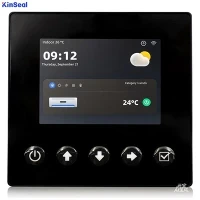


Whether we realize it or not, most of us, as everyday consumers, have formed some of our own opinions about the look and use of human-machine interfaces (HMIs). That's because our regular use of smartphones, websites, and even the controls in our cars actually involve digital HMIs. When we interact with them, we intuitively understand what's clear, what's easy to perform, and what's troublesome or difficult.
For plant equipment and systems, specialized industrial HMIs have been around for many years. Hardware and software have been improved to provide more options, but sometimes there are too many choices, resulting in more complex configurations than are actually needed. On the other hand, comprehensive standards have recently been better developed. However, standards are not always appropriate for every industry, system type, or preference, and they may not be specific enough for all the items an HMI must display.
Industrial system and original equipment manufacturer (OEM) developers, who need HMIs and want them to be useful, may not have the time or dedicated staff to create their own HMI standards and styles. The best option for solving this problem is usually simplicity and clarity, a proven method for providing optimal situational awareness and usability for HMIs. This article provides basic tips and best practices for planning and implementing an effective factory automation HMI.
Checking available resources
It is important to check available resources before starting any design from scratch. Industry documents and standards provided by ISA101 and other organizations provide HMI design guidelines, but many focus on the process industry, petrochemical industry, and nuclear industry.
Depending on the HMI platform used, the development environment may provide standard or optional object libraries, as well as other aids for creating new projects, and these resources are worth looking at. Keep in mind that some modifications will need to be made before these library objects can be adopted as a company standard.
Creating an effective plant HMI for a new application is often an iterative process that can be simplified if you start with applicable standards or samples. Defining building block objects is a good place to start.
Determining design elements
Each end user is likely to use a mix of typical industry elements, such as valves and pumps, as well as some specialized components - all of which must be displayed on the HMI. The first step should be to identify the elements that will be reused and create a standard design for each.
Not all HMI design elements are associated with physical devices.HMI objects, such as start/stop buttons, on/off indicators, recipe values, and data entry labels, are logical constructs that are necessary for the HMI to interact with the controller, but are not necessarily described in any mechanical or electrical design documents.
When it comes to controllers, usually programmable logic controllers (PLCs), the HMI must be developed in close conjunction with the PLC code. If the PLC has special device alarms or other derived values, such as motor run times, then the HMI must handle those alarms.
Building a Storyboard
Storyboards are a way to map the creative process. They are often associated with movies, but can also be useful in creating novels, architecture, and software. When developing plant HMIs, storyboards allow designers to pre-plan the number of screens and hierarchies required so that the team can review the process before undertaking important HMI configuration work.
Designers can create storyboards using text-based outlines, spreadsheets, sketches, or a combination of techniques.
Whichever method is used, it should be flexible and allow the review team to understand and help make good arrangements.
The storyboard should show how the system, subsystems, and other details are interrelated, which in layman's terms means what is displayed on each screen. This arrangement depends heavily on the complexity of the automation and the building block objects that must be displayed.
A basic machine may be configured with only one or two screens to depict all operating conditions and provide some objects for operator interaction. More complex machines have more screens, some of which provide detailed operator inputs, historical data trends, alarm/event logs, and derived performance and diagnostic information.
Once the complexity of factory automation reaches a certain level, it may be useful to introduce the concept of HMI organizational hierarchy, for example:
● Level 1 Dashboard: Provides an "overview" of operational information;
● Level 2 Typical Control: a simplified operational screen that provides basic monitoring and control options;
● Level 3 Detailed Controls: detailed operational screens that provide more information than Level 2;
● Level 4 Specific Controls: pop-up windows with very detailed configuration or diagnostic information that are used infrequently.
In building a storyboard, it is important to remember that team members should include not only programmers, but also people from other engineering disciplines, as well as operations staff, maintenance members, and administrators. Each member should contribute according to his or her role.
Defining the style of an HMI
The style of an HMI encompasses a number of look, feel and functionality factors. The current concept of a "high performance" HMI requires minimal color, simple objects, and what the user adopts must be appropriate for their particular application. Things to keep in mind when creating an HMI style guide include navigation and validity, color selection, data text definitions, simple graphics, and usability.
1. Navigation settings. Common sense suggests that the most important controls are usually the start and stop commands, and the navigation buttons, which should always be easy to use. It is common practice to reserve some space on each screen for these controls.
Pop-up windows are usually smaller screens that appear in front of the fully displayed screen and can be used to temporarily view and enter very specific information and then close them. Sometimes it is helpful to allow pop-ups to persist, such as the Proportional-Integral-Differential (PID) adjustment panel. However, while pop-up windows are useful for infrequently used detailed tasks, they can interfere with normal operations and take up space on the display, so they should be avoided as much as possible.
Passwords should be used as needed for security, but should be used with caution to avoid locking up the system and impeding operations personnel. It is often useful to accomplish adjustments to machine parameters on a single password-protected screen.
2. Use color with caution. Colors can be used for backgrounds, fonts, static elements, and animated objects, but they can be a highly controversial HMI theme. Most standards recommend using light gray backgrounds and grayscale objects and reserving color for unusual working conditions. This provides easy visibility and indicates important events to the user. However, certain industries or equipment may decide to use color. The power industry typically uses red for energization (danger) and green for power failure (safety). If the equipment item has three color-coded subsystems, these colors should be included on the title bar for easy identification.
Also, please avoid using animated color coding that depends only on the object. If possible, it is best to provide auxiliary supplemental symbols to indicate the state or condition of.
3. Define the text data. Styles also extend to what fonts are used and whether the text is capitalized. Define only a few fonts to cover the necessary options. Reserve larger or bold fonts for headings and important content and smaller fonts for details. Figure out which values are for display only and which can be entered by operations staff. Include engineering units and allowable ranges.
4. Simplify graphics to improve operational efficiency. One of the main benefits of digital HMI is the ability to present users with recognizable graphical images and icons that do not need to be read or reduce possible misunderstandings due to language barriers. However, this does not mean that graphics should be detailed engineering drawings, complex photographs or any animations.
Instead, modern best practice is to provide simplified iconic graphics wherever possible. Animation can be useful in certain limited situations, but it consumes processing resources and is often considered a distraction.
While the use of bitmap images is discouraged, there are many good reasons to include them in factory automation. For example, designers can label images of equipment and components with arrows to clearly indicate to the user where a problem is occurring.
5. usability first. Look into other advanced features that will help the operator do his or her job. Instead of just displaying the current level of a vessel, show the level as a trend so that the operator can see how recently the system has been operating. Go a step further and display key indicator values on the screen via mini-trends.
A similar concept applies to alarms. For most systems, it is important to indicate currently active alarms. A detailed historical alarm/event log with date/time stamps can help with timely troubleshooting by allowing the user to see how a problem is developing.
Situational awareness is the goal
The concept of situational awareness was developed from military doctrine and more recently from aviation, but it also applies to industrial factory automation design. The ultimate goal of HMI for automation systems is to provide all relevant information so that the user can understand what is happening and know what needs to be done.
While large engineering firms or process facility companies may have significant resources to devote to HMI development, smaller businesses, system integrators, and OEMs, can take full advantage of the latest design concepts. Consider the design themes and experiences described above at the beginning of the design process, and involve key personnel to ensure a clean and easy-to-use HMI experience is created.