




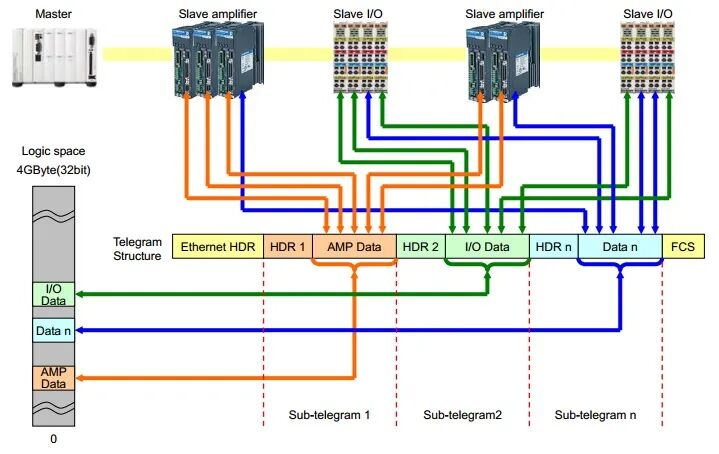
EtherCAT (Ethernet for Control Automation Technology) is a high-performance industrial Ethernet communication protocol widely used in the field of industrial automation. The initialization process is a critical step in ensuring stable system operation, involving hardware configuration, software setup, and the establishment of the network topology. The following detailed steps for EtherCAT bus initialization, combined with practical application scenarios and solutions to common issues, provide engineers with a systematic operational guide.
1. Hardware Connections and Physical Layer Check
Before initializing the EtherCAT bus, ensure that the hardware connections are correct and that there are no issues with the physical layer:
● Network Card and Cable Selection: It is recommended to use a dedicated network card that supports the EtherCAT protocol (such as the Intel I210 series) and shielded twisted-pair cable meeting CAT5e or higher standards to minimize electromagnetic interference. If using a standard network card, the TCP/IP protocol stack must be disabled in the Windows system (by disabling "Microsoft Network Client" and "QoS Packet Scheduler").
● Topology Verification: EtherCAT supports linear, tree, or star topologies. Check the daisy-chain connection order of slave devices and ensure that terminating resistors are correctly configured (the terminating resistor for the last slave must be enabled).
● Power Supply and Grounding: Provide a stable 24V power supply to the slave devices and ensure that all devices share a common ground to prevent communication errors caused by potential differences.
2. Master Software Configuration
The master software is the core of the EtherCAT network. Common platforms include TwinCAT, CODESYS, or open-source tools such as SOEM:
● Master Environment Setup: Using TwinCAT as an example, after installing the runtime environment, activate the EtherCAT master function in "TcNcConfig." For Linux systems, load the IgH master driver module (e.g., `ethercat master`).
● Network Adapter Binding: Specify the physical network interface card (NIC) used for EtherCAT communication within the software. For example, in TwinCAT, bind the network card's MAC address via the "Adapter" option; in the IgH configuration file, modify the `MASTER0_DEVICE` parameter.
● Master Clock Synchronization: Enable DC (Distributed Clock) mode, set the master as the reference clock source, and ensure all slaves achieve nanosecond-level synchronization accuracy. During configuration, specify the synchronization period (e.g., 1 ms) and offset compensation parameters.
3. Slave Device Scanning and Identification
● Importing XML Device Description Files: Each slave must provide an ESI (EtherCAT Slave Information) file containing PDO (Process Data Object) and SDO (Service Data Object) mapping information. Place the ESI file in the designated directory of the master software (e.g., the `IOEtherCAT` folder in TwinCAT).
● Online Scan and State Machine Transition: The master station software scans the bus to identify connected slave devices. Upon successful identification, the slave's status should display as "PREOP" (pre-operation mode). If the scan fails, check the following:
● Whether the slave's power supply is functioning normally.
● Whether the network cable connections are loose.
● Whether the slave's firmware version is compatible.
4. PDO Mapping and Process Data Configuration
● Input/Output Data Definition: Configure the PDO mapping for each slave according to application requirements. For example, map the servo drive's "Target Position" (0x607A) to the master's output area and "Actual Position" (0x6064) to the input area.
● SM (Sync Manager) Settings: Adjust the size of the Sync Manager's mailbox and process data area. A typical configuration uses SM0 for mailbox communication and SM2/SM3 for process data exchange.
● DC Synchronization Parameter Optimization: If using a distributed clock, calibrate the slave clock offset. This can be done automatically via the master's "Offset Compensation" function or by manually entering calibration values.
5. State Machine Transition and Real-Time Testing
● Stepwise Slave Activation: Use master station commands to transition the bus state from "INIT" to "PREOP" → "SAFEOP" → "OP." If a slave cannot enter "OP" mode, check its error code (e.g., 0x11 indicates an SDO communication timeout).
● Real-time Performance Verification: Use a logic analyzer or the master's built-in tools (such as TwinCAT's "Oscilloscope") to monitor jitter in periodic tasks. Ideally, jitter for a 1 ms cycle should be less than 10 μs. If jitter is excessive, optimize system real-time performance (e.g., adjust Windows thread priorities or switch to an RT kernel).
6. Troubleshooting and Common Issues
● Slave unresponsive: Check if termination resistors are enabled, or try reducing the communication speed (e.g., switching from 100 Mbps to 10 Mbps to troubleshoot signal quality issues).
● Periodic communication interruptions: This may be caused by a network storm; disable the switch's STP (Spanning Tree Protocol) or enable "Cut-Through" mode on an EtherCAT-dedicated switch.
● SDO Access Failure: Verify whether the slave's CoE (CANopen over EtherCAT) protocol supports the SDO index in question, or check if the mailbox timeout is set too short (recommended default value ≥ 1000 ms).
7. Advanced Feature Extensions
● Hot-Plug Support: Enable the "Hot Connect" feature in the configuration to allow adding or removing slaves during runtime. Note that a bus rescan may cause a brief communication interruption.
● Redundant Network Configuration: Achieve link redundancy using dual network cards; configure a redundancy manager (e.g., Beckhoff's ERM module) in the master software.
● Third-Party Device Integration: For non-standard slaves, you may need to customize the ESI file or manually configure PDOs via ESC (EtherCAT Slave Controller) registers.
Conclusion
The complexity of EtherCAT initialization stems from its high-performance design, but engineers can complete configuration quickly with standardized processes and tool support. In practical applications, it is recommended to save the master configuration file (such as TwinCAT's *.xti file) to facilitate future maintenance or device replacement. With the widespread adoption of EtherCAT G (the Gigabit version), the initialization process may be further simplified in the future, but the core logic will still revolve around hardware compatibility, data mapping, and real-time optimization.