

The fundamental principle of industrial cameras for photography is triggered by a signal to control the camera's internal circuitry through the steps of exposure, image capture, and photo transmission. This process can be divided into internal triggering and external triggering, each corresponding to different application scenarios.
1. Internal Triggering: Image capture and stop are controlled via software, with the capture frame rate also controlled by software;
Advantages: High programmability, flexible control, no additional wiring required, and convenient for debugging;
Disadvantages: In large-scale complex projects, time control precision may be insufficient, and latency may increase.
2. External Triggering: An external device connects to the camera via its I/O interface, and the trigger signal is sent from the external device to the camera to initiate image capture.
Advantages: High time control precision, minimal latency concerns due to external electrical signal control, and stable multi-camera triggering;
Disadvantages: Troubleshooting may take longer when reproducing issues.
External Triggering Classification:
1. Edge Triggering Mode.
Select either the rising edge or falling edge as the trigger condition. When a valid trigger signal is received on the trigger terminal, the camera begins capturing a frame of images and transmits them to the host.
2. Level Trigger Mode.
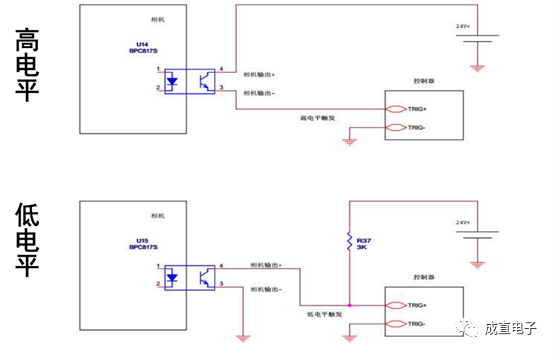
Select either a high level or low level as the trigger condition. When the trigger signal reaches a valid level, the camera begins capturing a frame of images and transmits them to the host.
Overlapping exposure and non-overlapping exposure
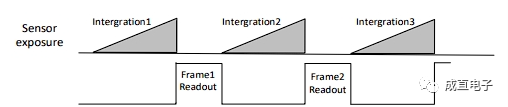
The camera acquires an image frame in two stages: exposure and readout. Depending on the type of sensor used by the camera, the overlap between the exposure time and readout time varies, resulting in two types: overlapping exposure and non-overlapping exposure.
1. Non-overlapping exposure: Non-overlapping exposure refers to the process where the exposure and readout of the current frame are completed before proceeding to the exposure and readout of the next frame. The frame cycle of non-overlapping exposure is greater than the sum of the exposure time and frame readout time.
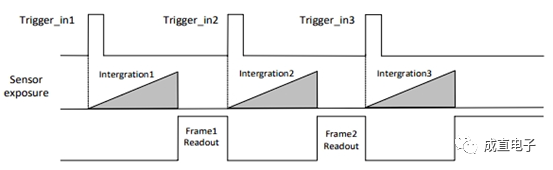
Trigger response mode: The camera can be set to trigger image capture on the rising edge, falling edge, high level, or low level of an external signal.
Trigger delay: The delay time between receiving the trigger signal from the camera and actually responding to the trigger signal to take a picture can be set as the trigger delay.
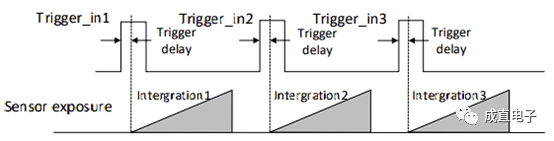
Trigger Cache Enable: The camera has a trigger cache enable function, which means that if a new trigger signal is received during the trigger process, the signal can be retained and processed. The trigger cache enable function can retain and process up to two trigger signals.
Assuming the current trigger is the first one, if the camera receives a second trigger signal during the processing of the first trigger signal without enabling trigger cache, the second trigger signal is directly filtered and not processed.
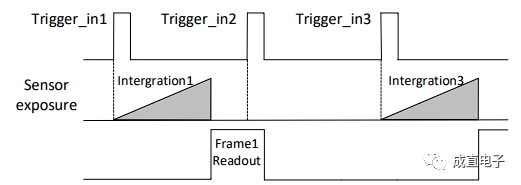
Enable trigger cache: The second trigger signal is retained. If the exposure end time of the first frame image of the second trigger signal is not earlier than the output time of the last frame of the first trigger signal of the camera, then the first frame image of the second trigger signal will be output normally.
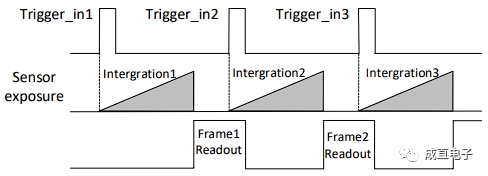
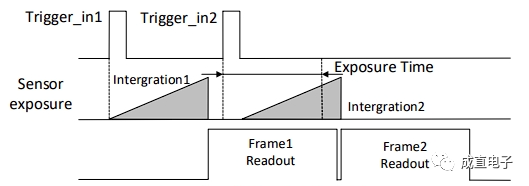
If the exposure end time of the first frame image of the second trigger signal is earlier than the output time of the last frame of the first trigger signal in the camera, the camera will internally process the exposure start time of the first frame image of the second trigger signal to ensure that the exposure end time of the first frame image of the second trigger signal is not earlier than the output time of the last frame of the first trigger signal.
Anti-shake trigger: External trigger signals sent to the camera may contain noise, which could cause false triggers if they enter the camera directly. In this case, the trigger signal can be processed to reduce noise.
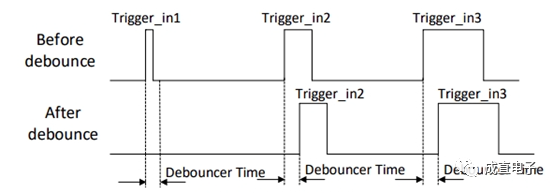
Trigger Output Signal Settings: The camera's trigger output signal is a switch signal that can be used to control external devices such as alarm lights, light sources, and PLCs. The trigger output signal can be level-inverted.
01 Camera I/O
The I/O signals in the camera are bidirectional I/O, which can be used as input signals or output signals.
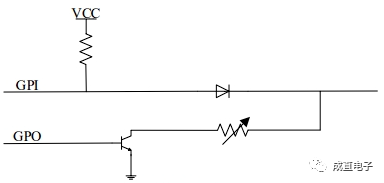
Configure bidirectional I/O as input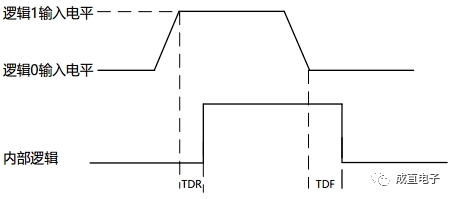
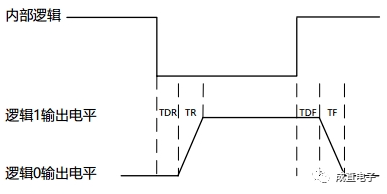
02 I/O Wiring Diagram
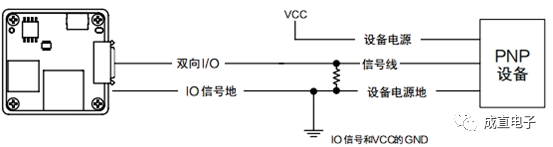
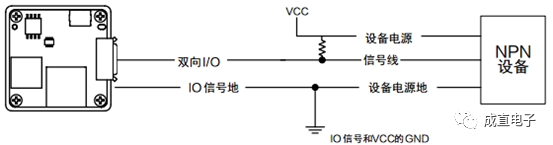
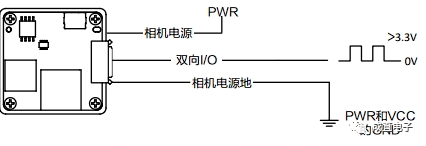
When the camera uses bidirectional I/O as a hardware trigger signal source, the wiring differs depending on the external device of the input signal.
Input signal is PNP device
Input signal is an NPN device
Input signal is a switch, and the switch can provide a low level to achieve bidirectional I/O triggering.
03 I/O Wiring Diagram
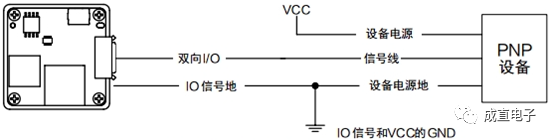
When the camera uses bidirectional I/O as an output signal, the wiring differs depending on the connected external device.
External PNP device
External NPN device
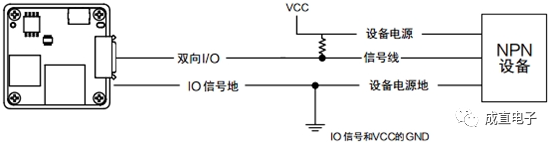
Camera and controller wiring diagram