


Mitsubishi PLC (Programmable Logic Controller), as a core device in the field of industrial automation, relies on the indicator lights on its panel for operators to judge the operating status of the equipment. Taking the FX series as an example, the four main indicator lights are POWER, RUN, BATT, and ERROR, with each light's status change corresponding to different equipment operating conditions. The following will provide a detailed analysis of the functions, common problems, and countermeasures of these indicator lights, helping users quickly locate and resolve abnormal situations during PLC operation.
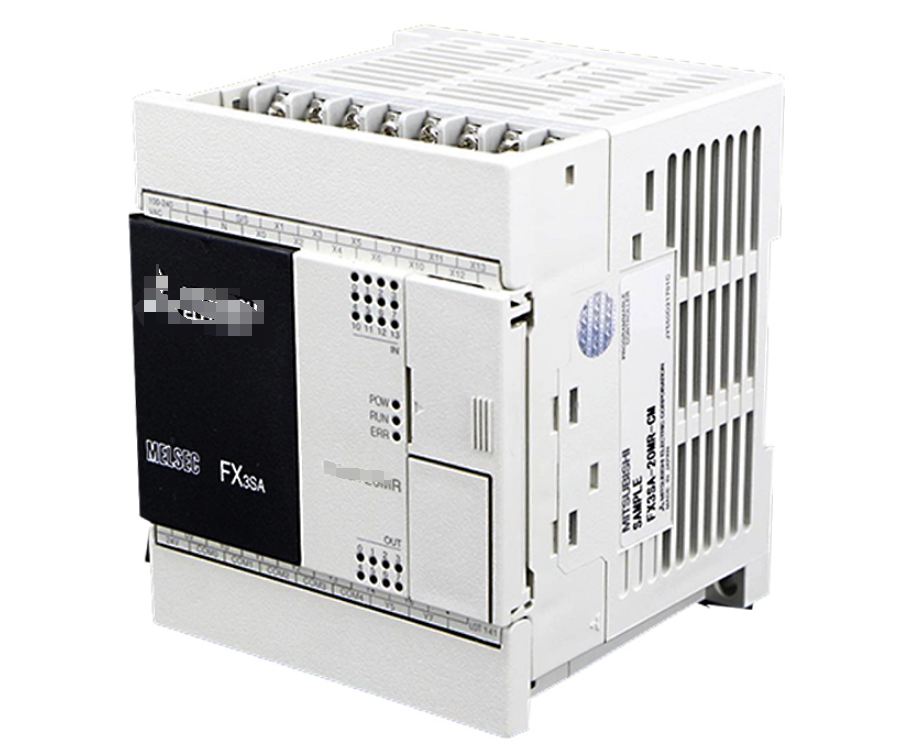
I. POWER (power indicator light)
State resolution:
● Always on (green): indicates that the PLC has been connected to the external power supply and the internal power module is working properly.
● Extinguishing: It may be caused by external power interruption, poor contact of the power cord, or damage to the internal power module.
Common problems and solutions:
1. The indicator light is not on:
Check if the input voltage is within the rated range (such as AC 100-240V or DC 24V).
Confirm that the power terminal wiring is secure and there are no short circuits or open circuits.
If it still doesn't light up after excluding external issues, consider replacing the power module.
2. Blinking or abnormal lighting:
It may be due to power fluctuations or excessive load. It is recommended to use a voltage regulator or check the backend circuit load.
Case reference: The PLC power light in a certain factory flashes frequently, and it was eventually found that the voltage in the workshop was unstable. After installing UPS, the problem was solved.
II.RUN (running indicator light)
State resolution:
● Always on (green): The PLC is running normally and the program is executing in a loop.
● Extinguish: may be in stop mode (STOP), program error, or hardware failure.
Flashing: Commonly seen during program debugging or communication interruptions.
Common problems and solutions:
1. Unable to switch to RUN mode:
Check if the mode switch is turned to the "RUN" position (some models require software settings).
Confirm that the program has no fatal errors (such as logical conflicts or unprocessed exception instructions).
2. Suddenly turn off during runtime:
It may be due to the watchdog timer timeout (program dead loop) or hardware overheating, requiring a restart and checking the program logic.
Technical tip: By monitoring the PLC status through GX Works2 software, program error codes can be quickly located.
III. BATT (battery indicator light)
State resolution:
● Extinguish: The built-in lithium battery voltage is normal (usually 3.6V) and can maintain RAM data storage.
● Always on or flashing (red): The battery is low and needs to be replaced in a timely manner, otherwise it may cause program loss.
Maintenance suggestion:
1. Regular inspection: It is recommended to replace the battery (model FX-32BL) every 2-3 years.
2. Replacement steps:Operate while powered on to avoid data loss.
After removing the old battery, complete the installation of the new battery within 5 minutes.
Attention: Some new PLCs use flash storage to save programs without the need for batteries, but the clock function still requires battery support.
IV. ERROR (error indicator light)
State resolution:
● Always on (red): indicates hardware failure or serious program error (such as abnormal I/O module).
Flashing: Minor error (such as communication timeout or improper parameter settings).
● Extinguish: No error status.
Troubleshooting process:
1. Hardware inspection:
Confirm that all modules are securely installed without looseness or poor contact.
Check if the I/O terminal wiring is correct to avoid short circuits or reverse connections.
2. Software diagnosis:
Read error codes through programming software (such as "E001" indicating CPU abnormality).
Refer to the error code table in the manual and fix the program or replace the hardware accordingly.
Typical case: The ERROR light on a certain device is constantly on, and it was diagnosed that the output module was overloaded and burnt out. After replacement, it was restored to normal.
V. Comprehensive Fault Handling Guide
When multiple indicator lights are abnormal, systematic analysis is required:
1. POWER+RUN turn off simultaneously: Prioritize troubleshooting power issues.
2. RUN+ERROR flashing alternately: It may be a program logic error or communication interruption.
3. BATT+ERROR red light: The battery is depleted, causing data verification to fail. The battery needs to be replaced and the program needs to be downloaded again.
Preventive maintenance recommendations:
Regularly backup programs to computers or the cloud.
Maintain a dry and ventilated working environment for the PLC, avoiding the influence of high temperature or dust.
Conclusion
The indicator lights of Mitsubishi PLC are the "barometer" of equipment health. Understanding their meaning and being able to quickly respond to abnormalities can greatly improve production efficiency and reduce downtime risks. It is recommended that users establish a comprehensive maintenance process based on the error code table in the manual and actual operating experience. For complex faults, Mitsubishi's official technical support or authorized service providers can be contacted for in-depth diagnosis.