


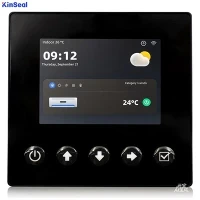


In the field of industrial automation, HMI stands for Human Machine Interface. HMIs are used in industries to control and monitor machines. Without HMI, it is difficult to have a good automation process in industry.
Definition of Human Machine Interface
A human-machine interface (HMI) is a user interface that allows a human operator to interact with a machine or process.HMIs are typically used in industrial environments to allow operators to monitor and control processes, such as those found in factories or power plants.
HMIs can take many forms, including a graphical user interface (GUI) on a computer, a touch screen, or a physical control panel with buttons and displays. They are used to present process data to the operator, allow the operator to enter commands and setpoints, and provide alarms and other information.
HMIs are usually connected to a Programmable Logic Controller (PLC), which is responsible for controlling the process based on inputs from the HMI and sensors in the field.The HMI simply provides information to the operator and allows them to enter commands, which are then sent to the PLC for implementation.
Types of HMIs
Graphical User Interface (GUI): these are computer based HMIs that use a graphical interface to display process data and allow the operator to enter commands. the GUI can be created using software such as Microsoft Windows or specialized HMI software packages.
Touch Interface (Touchscreen Interface): Interacts by touching the screen, has a simple, intuitive interaction, and is commonly used on devices such as smartphones, tablet PCs, and interactive whiteboards.
Voice Interface (Voice Interface): Interaction through voice recognition technology, users can control the computer through voice commands, commonly used in smart speakers, car systems and other devices.
Physical Panels: These are physical HMIs that use buttons, switches, and displays to display process data and allow operators to enter commands. Often used in industrial environments where a GUI or touchscreen may not be practical, such as environments with high levels of vibration or dust.
Web-based interfaces: These HMIs use a Web browser to present process data and allow the operator to enter commands. They can be accessed from any device via a Web browser, allowing the operator to monitor and control the process remotely.
HMI Selection
When selecting a human-machine interface (HMI) for an industrial process or system, several factors need to be considered to ensure that the HMI is best suited for the particular application.
Compatibility: It is important to select an HMI that is compatible with the equipment and systems it will control. This includes compatibility with the control system, communication protocols and data formats used by the device.
Hardware: The HMI should be designed to be rugged and suitable for the environment in which it will be installed. It should be able to withstand the temperature, humidity and vibration it will be subjected to.
Display: The HMI should have a clear, easy to read and easy to navigate display. The screen should have good resolution with high quality display and backlighting.
Usability: The HMI should be easy to operate and understand, with intuitive navigation and a clear and concise display. It should be easy to use and understand for operators with different levels of expertise.
Data Visualization: The HMI should be able to display data in a clear and meaningful way, using graphs, charts and other types of visual representations to help operators understand processes and make informed decisions.
Customizability: The HMI should be customizable to fit the specific needs of the process or equipment, as well as operator preferences.
Remote Access: The HMI should be designed to allow remote access so that operators can monitor and control the process from a remote location.
Scalability: The HMI should be designed to be scalable, able to handle more complexity and data as the process or equipment becomes more advanced.
Support: HMI vendors should provide good technical support and documentation, as well as software updates and upgrades.
Benefits of Human Machine Interfaces
Human Machine Interfaces (HMIs) offer several benefits for controlling and monitoring industrial processes:
Increased Efficiency: HMIs increase the efficiency of the process being controlled by allowing operators to easily access process data and enter commands. By presenting data in a clear and concise manner, operators can make more informed decisions and take timely action when necessary.
Improved Safety: HMIs can improve safety by displaying alarms and other important information to operators. This allows operators to take timely action to resolve potential problems before they become serious.
Remote monitoring and control: Many HMIs can be accessed remotely, allowing operators to monitor and control processes from a distance. This is particularly useful in applications where the process is located in a remote or hazardous location.
Ease of Use: HMIs are designed to be easy to use, even for operators who may not have technical expertise. This makes them accessible tools for controlling and monitoring industrial processes.
Uses of HMIs
HMIs communicate with programmable logic controllers (PLCs) and input/output sensors to acquire and display information for the user to view.HMI screens can be used for a single function, such as monitoring and tracking, or for performing more complex operations, such as shutting down a machine or increasing the speed of production, depending on how they are implemented.
HMIs are used to optimize industrial processes by digitizing and centralizing viewer data. By utilizing an HMI, operators can view important information displayed in graphs, charts or digital dashboards, view and manage alarms, and connect with SCADA, ERP and MES systems all from one console.
Previously, operators were required to constantly walk the floor to check mechanical progress and record it on a piece of paper or whiteboard. By allowing PLCs to transmit real-time information directly to HMI displays, HMI technology eliminates the need for this outdated practice, thus reducing many costly problems caused by lack of information or human error.
Human Machine Interface Applications
Human Machine Interfaces (HMIs) are used in a variety of industrial applications where they can help improve the efficiency, safety, and accessibility of the process being controlled.
Some common applications for HMIs include:
Manufacturing: HMIs are commonly used in manufacturing environments to control and monitor production processes, such as those on the factory floor. They can be used to present process data to operators, allowing them to enter commands and setpoints, as well as display alarms and other important information.
Power generation: HMIs are also used in power plants, such as those using fossil fuels or renewable energy, to monitor and control processes such as boiler operation, turbine control, and power generation and distribution.
Water and Wastewater Treatment: HMIs are used in water and wastewater treatment plants to control and monitor processes such as pumping, treatment and distribution.
Oil and Gas: HMIs are used in oil and gas production and refining to control and monitor processes such as drilling, pumping and refining.
Chemical Processing: HMIs are used in chemical processing plants to control and monitor processes such as mixing, reacting and distilling.
HMI Design Tools
Based on HTML5 (Canvas/WebGL/WebVR) standard Web technology, DigitalView software meets the demand for cross-platform cloud-based deployment and implementation of industrial Internet of Things, and freely builds large-screen configuration, UI configuration, industrial configuration, and 3D configuration in the form of low-code visualization.
Sovit software visualization development platform (Sovit2D, Sovit3D) is a powerful Web-based configuration online editor, the use of HTML5 technology, based on B/S architecture, support for 2D/3D graphics configuration, mqtt protocol access. It provides a rich library of industry-standard components and multi-industry templates and components, which enables convenient human-computer interaction on the browser side, and simple drag-and-drop to complete the visualization page arrangement and design, and quickly build SCADA, HMI, dashboard, and IIOT systems for pan-industrial IoT scenarios.