


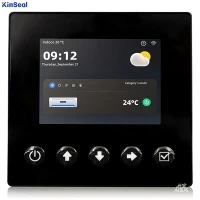


Human Machine Interface (HMI) has many hardware and software functions. The user should first set the target application and then find a solution that fits the needs of the application.
End users expect intuitive interfaces, and product designers respond by building these HMIs into more products. For industrial automation, human-machine interfaces (HMIs) are a mature technology that is a useful addition to many machine and process automation applications, extending the functionality of switches, buttons, and lights in control panels. While this is familiar, it is still important not to lose sight of the fact that each use case for HMIs should be carefully evaluated to ensure that the right product is selected based on the needs of different applications.
Start by looking at the HMI functionality required and try to make an initial selection of equipment and software that meets the needs. A more reliable approach is to examine the specific application requirements and then work backwards to confirm that the necessary options have been selected. The environmental conditions of the target application need to be evaluated, as the HMI must be installed in a viable area. Most options are straightforward, but some are not.
In some environments, if the HMI is susceptible to being dropped into water or sprayed directly by water, it will need to meet the requirements for protection ratings in standards such as NEMA250 or UL50 for electrical equipment. Cleaning chemicals, process chemicals, or other airborne contaminants can also affect the HMI. Site contamination levels or material safety data sheets can help define expected environmental conditions. Customer requirement specifications, local installation regulations, or preferences may require that certain ratings or certification standards be met.
Another key issue is whether to locate the HMI indoors or outdoors; NEMA and UL ratings are often restricted to "indoor use only. Even the brightest HMIs will still suffer from direct sunlight outdoors, and direct sunlight can cause heat problems. Users should consider locating outdoor HMIs in more protected areas or equipping them with sun shields.
HMIs often contain sensitive display elements and backlights that may require a higher operating temperature range than other automation components. Display brightness and average backlight life should be carefully evaluated. Brightness represents the visibility of the display. A constantly bright backlight can indicate how long the unit can be used.
Choosing the right display size usually requires a balance. Most operators want the largest possible display size, even more so when they need to select a touch link, even if the application is only for viewing, such as when they need to view the monitor from a distance, the larger the monitor the better. Larger displays give programmers more room to develop graphics. The various sizes of HMI hardware product lines can help users learn one system for several different models.
But larger HMIs often also mean higher costs and may take up valuable control panel mounting space. The monitor should be mounted at a height that meets the work needs of most employees, usually about 66 inches from the floor to the monitor.
In addition to the many physical sizes of the display, most HMIs are available in a wide range of colors, and users can compare resolution in pixels, which determines the level of detail in the graphic display. For certain special needs applications, especially those involving data entry, users may wish to use an on-board physical keypad or an external keyboard and mouse. Most designers will follow the trend and choose to use a touch screen.
It is important to note that many consumer touch devices tend to use capacitive multi-touch. This technology typically does not sense gloved fingers and can be affected by water, but it does respond to multiple concurrent touches or gestures. Industrial HMIs, on the other hand, typically utilize resistive single-touch technology. Resistive touchscreens respond to gloved fingers, can only respond correctly to one touch at a time, and are unaffected by external contaminants, which is often preferred for industrial applications.
The HMI software should be evaluated for its configuration environment, runtime functionality, and remote access. Programmers need to spend a lot of time on the HMI configuration environment. For the end user, it is important to obtain a software license or confirm that the software is free. Typical users will be interested in the ease of use of the software as well as features such as drag-and-drop editing, single-click object creation, and whether the most commonly used objects are pre-defined.
Programmers want to know if the software has good support for import/export, if it has database tools, if it provides efficient replication methods, and if it includes a built-in simulation or test environment so that users can perform proof-of-concepts of their projects and check out the program without the need for actual hardware. Programmers use configuration software to create tags that communicate with PLCs and other devices, to develop graphics that link to those tags, and to configure other built-in HMI features.
Even if the HMI has been provided with the appropriate functionality on the specification sheet, users need to be aware that the actual implementation may not always turn out as expected. For users who require a specific look and feel and functionality, it is a good idea to do a brief summary comparison of several types of HMI configurations, list the necessary features, and obtain configuration software to test them.
It may be necessary to investigate the details of a particular HMI before selecting an advanced application. Special attention may need to be paid to: the way the HMI handles floating point labels and any associated math or calculations. Logic is usually executed within the PLC; information is displayed on the HMI. Some HMIs provide on-board logic, trigger evaluation, executive functions and event manager functions. The above functions facilitate a finer-grained display and can be engaged as part of the machine logic. If complex functions are required, pre-test each function.